
Written by Tahan · October 13, 2026
Housecall Pro costs less than Jobber for most small crews, and Jobber costs less once you pass eight people. On the plans most crews compare (Jobber Grow on a one-year commitment against Housecall Pro billed monthly), Housecall Pro is cheaper from 1 to 8 people and Jobber is cheaper from 9 up. The plans don't line up feature for feature, though, and the gap changes once you price the features you actually need. Jobber is the better pick for shops at 9 people and up, and for 6 to 10-person shops that want QuickBooks sync without paying for the top plan. Housecall Pro is the better pick for small crews that want online booking and review requests on the cheapest plan.
Disclosure: this comparison is published by Own Your Tools, a third option covered at the end. Prices come from getjobber.com/pricing and housecallpro.com/pricing, checked October 9, 2026.
Price by crew size
| Crew | Jobber Grow (1-year commitment) | Housecall Pro (billed monthly) | Cheaper |
|---|---|---|---|
| 1 | $169 | $79 (Basic) | Housecall Pro by $90 |
| 2 to 5 | $259 | $189 (Essentials) | Housecall Pro by $70 |
| 6 to 8 | $349 | $329 (MAX) | Housecall Pro by $20 |
| 9 | $349 | $364 (MAX + 1 user) | Jobber by $15 |
| 10 | $349 | $399 (MAX + 2 users) | Jobber by $50 |
Billed annually, both drop. Jobber Grow runs $149, $229 and $299 for the 1, 5 and 10-user bands. Housecall Pro runs $59, $149 and $299 for Basic, Essentials and MAX, plus $35 a month for each user past 8.
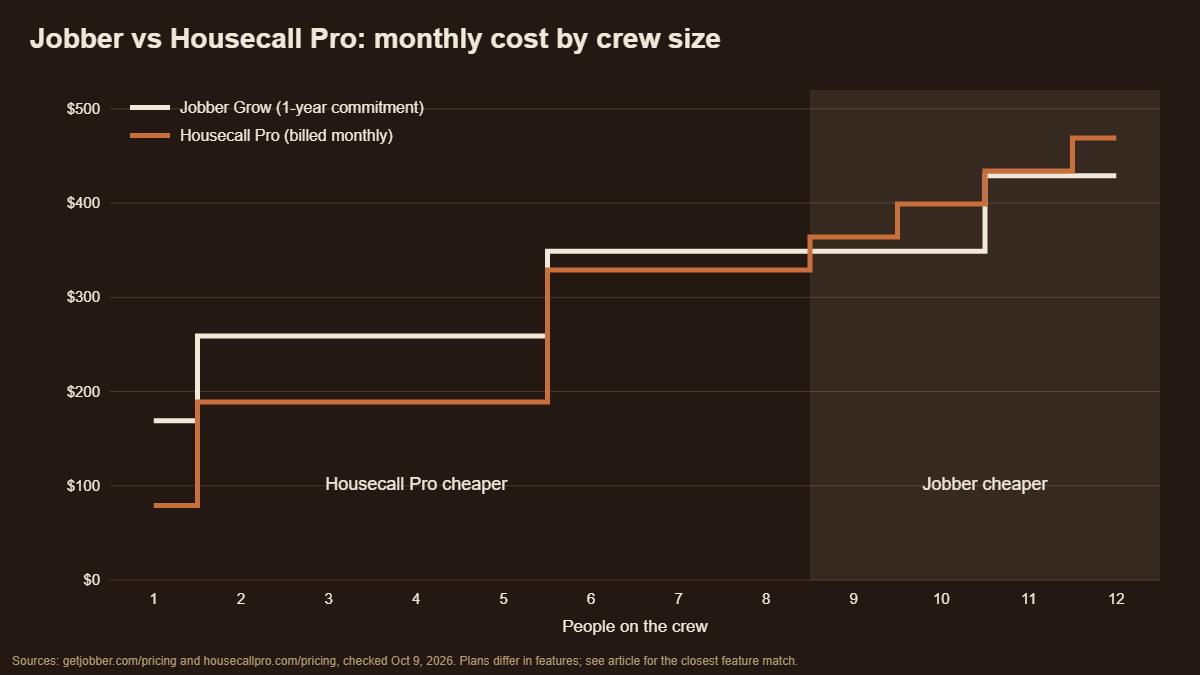
The price jumps land in different places. Jobber's Grow plan steps up at the 2nd, 6th and 11th person. Housecall Pro steps up at the 2nd and 6th, then adds $35 for every person past 8. That's why Housecall Pro holds the lead through 8 people and loses it right after.
The plans don't match feature for feature
Comparing plan to plan at the same crew size isn't quite fair, because each company gates different features at different tiers.
If you're solo and just need quotes and invoices, Jobber's Core plan is the cheapest option in this comparison at $29 a month billed annually. It's built for one user and can add one extra seat. Housecall Pro Basic is $59 billed annually, but it includes online booking, invoice reminders and review requests, which Jobber holds back for higher plans or sells as add-ons.
If you need QuickBooks sync, Housecall Pro puts it on Essentials ($189 a month) and up. Jobber puts it on Connect and up. At 6 to 10 people, a shop that needs QuickBooks but not two-way texting can run Jobber Connect at the 10-user band for $259 a month on a one-year commitment, against $329 to $399 for Housecall Pro MAX. That's the one place where matching features moves the answer by more than $100 a month.
If you need two-way texting and job costing, Jobber puts both on Grow, which is the plan in the main table.
Features where they differ
| Jobber | Housecall Pro | |
|---|---|---|
| Online booking | Yes, from Core | Yes, from Basic |
| Automated reminders and follow-ups | Connect and up | Invoice reminders from Basic |
| QuickBooks sync | Connect and up (QuickBooks Online and Xero) | Essentials and up (QuickBooks Online and Desktop) |
| Review requests | Add-on, $39 a month (or inside Marketing Suite) | Included from Basic |
| Phone support | Unlimited phone support listed on Plus | Phone and coaching below MAX; escalated phone support on MAX |
| Free trial | 14 days | 14 days |
| Mobile app | Native iPhone and Android | Native iPhone and Android |
The short read: Housecall Pro packs more customer-facing features into its cheaper plans, especially booking and reviews, and offers phone help below its top plan. Jobber spreads its features across more tiers and saves its listed unlimited phone support for Plus.
Payments
The card rates are close. Jobber publishes 2.9% + $0.30 for online cards and 2.7% + $0.30 for tap to pay. Housecall Pro publishes 2.59% tapped, 2.99% online and 3.49% keyed in. Both charge 1% on bank (ACH) payments and an extra 1% for instant payouts.
On a $5,000 job paid online by card, that's $145.30 on Jobber and $149.50 on Housecall Pro. For a shop that taps a lot of cards in the field, Housecall Pro's tapped rate comes out slightly ahead. Neither difference is big enough to decide between them. For more, see Who Owns Your Merchant Account?
Leaving
This is where they differ the most. Jobber lets an admin cancel online. On a one-year commitment, access runs to the end of the full term, and once the subscription ends, Jobber's help center says you lose access to your account data. Housecall Pro cancels through a support chat, and its help center says billing doesn't stop until a team member has spoken with the account owner by phone.
Either way, export everything first. Our guide to switching field service software covers the exports for both.
Who should pick which
Solo, just quotes and invoices: Jobber Core. It's the cheapest plan in the comparison.
Solo or 2 to 5, want booking and reviews built in: Housecall Pro. Basic and Essentials include more customer-facing features for less.
6 to 8, need QuickBooks: Jobber Connect, if you can live without two-way texting. Otherwise it's close, and Housecall Pro MAX edges Jobber Grow by $20.
9 to 10: Jobber. The 10-user band covers you, and Housecall Pro's per-user charge past 8 adds up.
Want the easiest exit: Jobber, with an online cancel button, though the one-year commitment still runs its term.
A third option: own it instead
Both Jobber and Housecall Pro are monthly plans that grow with your crew. Over five years, a 10-person crew pays $20,940 on Jobber Grow and $23,940 on Housecall Pro MAX.
Own Your Tools works differently. It's a one-time license, $490 at the founding price or $49 a month for 12 months and then it's yours, with an annual platform fee capped at $99 from year two. Ten seats are included, and customer payments go straight into your own Stripe account. It doesn't send automated customer texts or sync live with QuickBooks, and support is by email, so it isn't a feature-for-feature match for either one. For the full side-by-side, see Jobber vs Own Your Tools.
FAQ
Is Jobber or Housecall Pro cheaper? Housecall Pro is cheaper for crews of 1 to 8 when comparing Jobber Grow on a one-year commitment with Housecall Pro billed monthly. Jobber is cheaper from 9 people up. For solo operators who only need quotes and invoices, Jobber Core at $29 a month billed annually is the cheapest plan of either.
Which has better QuickBooks integration? Both sync with QuickBooks Online. Housecall Pro also syncs with QuickBooks Desktop, starting on Essentials. Jobber syncs with QuickBooks Online and Xero starting on Connect.
Which is easier to cancel? Jobber lets an admin cancel online. Housecall Pro requires a support chat and a phone call with the account owner before billing stops.
Do Jobber and Housecall Pro charge per user? Jobber sells user bands (1, 5, 10 and 15 users on Grow). Housecall Pro caps users by plan (1, 5 and 8), then charges $35 a month for each user past 8 on MAX.
Which has better phone support? Housecall Pro offers phone help and coaching calls on Basic and Essentials, with escalated phone support on MAX. Jobber lists unlimited phone support on its Plus plan.
Sources
- Jobber plans, bands, payments and features: getjobber.com/pricing and Jobber Help Center, checked October 9, 2026.
- Housecall Pro plans, payments and features: housecallpro.com/pricing and Housecall Pro Help Center, checked October 9, 2026.
- Own Your Tools: ownyourtools.work and Terms, October 2026.
- Five-year totals are the monthly rate times 60, excluding card processing, add-ons and taxes.