
Written by Tahan · October 9, 2026
For most contractors, the card rate isn't where field service software differs. Jobber, Housecall Pro and Stripe's standard pricing all land in roughly the same range, about 2.6% to 3.5% per card payment depending on how the card is taken. The real differences are in what sits on top of that rate (instant payout fees, bank payment options) and in who owns the account your customers pay into. That second part matters most the day you switch software.
Disclosure: this guide is published by Own Your Tools, which appears in the comparison. Competitor rates come from public pricing and help pages, checked October 9, 2026.
What a card payment costs
| Card rate | Bank (ACH) payment | Instant payout | |
|---|---|---|---|
| Jobber Payments | 2.9% + $0.30 online, 2.7% + $0.30 tap to pay | 1% | Extra 1% |
| Housecall Pro | 2.59% tapped, 2.99% online, 3.49% keyed | 1% | Extra 1% (Instapay) |
| Stripe, standard pricing | 2.9% + $0.30 online | Not covered here | Not covered here |
On a $5,000 job paid online by card, that works out to $145.30 on Jobber's standard rate, $149.50 on Housecall Pro's online rate, and $145.30 on Stripe's standard rate. Those numbers are within a few dollars of each other. These are published rates. Your account's actual rate can differ, so check your own payment settings.
Two things move the number more than the base rate does.
Instant payouts. Waiting the standard couple of business days is free. Getting the money the same day costs an extra 1% on both Jobber and Housecall Pro, which is about $50 more on that $5,000 job. Do that every week and it adds up fast.
Bank payments. Jobber and Housecall Pro both take ACH bank payments at 1%, or $50 on a $5,000 job, against roughly $145 by card. On big tickets, getting customers to pay by bank transfer saves more than any rate negotiation.
Two ways software handles payments
Behind the rate, there are two different setups.
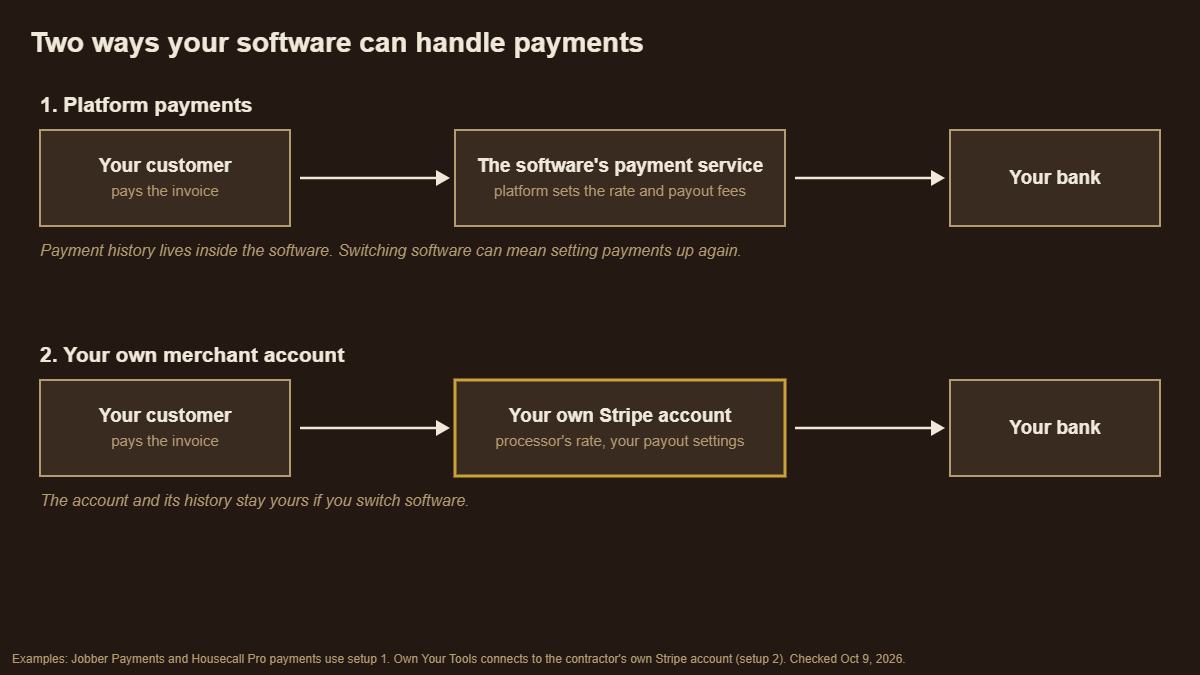
Platform payments. The software company runs payments as part of its product. Jobber Payments and Housecall Pro's payments both work this way. You turn it on inside the app, the platform sets the rate and the add-on fees, and the payment history lives inside that platform. It's convenient, and for many shops it's the right call. Jobber's help center says the payment rate is determined by your Jobber plan, though its pricing page lists the same rates on every plan, so check the number in your own Jobber Payments settings.
Your own merchant account. You hold the payment account yourself, usually with Stripe, and the software connects to it. The processor's own rate is what you pay. The account, the payout settings and the transaction history belong to you, not to the software, and they stay with you if you change software.
What changes when you switch software
This is where the setup matters. If your payments run through your field service platform, leaving that platform can mean:
- Setting up a new way to take payments, possibly at a different rate.
- Your payment history staying in the old system unless you export it.
- Customers possibly re-entering card details on the new system's checkout.
If you hold your own merchant account, the software changes but the account doesn't. Your rate, your history and your payout setup carry over.
None of this is a reason to avoid platform payments. It's a reason to know which kind you have before you sign up for anything.
Questions to ask before you turn on payments
- Who owns the merchant account, you or the software company?
- Is the card rate tied to your plan? If you downgrade, does it go up?
- What does instant payout cost, and how often will you use it?
- Can customers pay by bank transfer, and at what rate?
- Does the software add any percentage on top of the processor's fee?
- If you leave, what happens to your payment history?
Where Own Your Tools fits
Own Your Tools uses the second setup. It connects to the contractor's own Stripe account, customers pay invoices by card through the customer portal, and the money goes straight into that account. Own Your Tools takes nothing on top. Stripe's own fees are the only fees.
It's narrower than the platform options in one important way: Own Your Tools takes card payments only through its portal. It doesn't take bank transfers, so on a large job a customer who would pay by ACH elsewhere pays by card here, or pays by cash, check or another method that you record by hand. For shops that bill a lot of five-figure jobs, that's worth weighing.
FAQ
What does Jobber charge for payment processing? Jobber Payments publishes 2.9% + $0.30 for online card payments and 2.7% + $0.30 for tap to pay, the same on every plan. Bank payments are 1%, and instant payouts cost an extra 1%. Jobber's help center says your rate is determined by your plan, so confirm it in your account.
What does Housecall Pro charge for payment processing? Card rates start at 2.59% for tapped cards and run 2.99% online and 3.49% keyed in. Bank payments are 1%, and Instapay same-day payouts add 1%.
Is it cheaper to use Stripe directly? Stripe's standard online card rate is 2.9% + $0.30, about the same as Jobber's standard rate. The bigger difference is ownership: with your own Stripe account, the account and its history stay with you if you change software.
How can contractors lower payment processing fees? Ask big-ticket customers to pay by bank transfer where your software supports it, skip instant payouts unless you need the cash that day, and check whether your card rate is tied to your software plan.
Sources
- Jobber Payments rates: getjobber.com/pricing and Jobber Help Center, checked October 9, 2026.
- Housecall Pro rates: housecallpro.com/pricing and Housecall Pro Help Center, checked October 9, 2026.
- Stripe standard pricing: stripe.com/pricing, checked October 9, 2026.
- Own Your Tools: ownyourtools.work, Privacy Policy and Terms, October 2026.